PECRA VS STUNNA
Pecra App Review: The G7X Look, the Price, and a Stunna Alternative
What Pecra does, what it costs in the US, why recent reviews are so harsh, and how Stunna and a free browser G7X filter compare.
Try the idea on your own photo with Stunna.


Free to download. Pro options available.

Pecra arrived on the App Store in January 2026 with one clear promise: make a phone photo look as if it came out of a Canon G7X, the compact camera behind the flashy, slightly overexposed party photos all over TikTok. Its own TikTok videos have hundreds of thousands of views, and searches for the app have climbed every month since spring. We make Stunna, which also does digicam and flash looks, and we run a free Canon G7X filter in the browser, so we are a competitor and not a neutral judge. Every fact about Pecra below comes from its App Store listing, website and public reviews, checked on October 12, 2026.
The short answer
Pecra is a single-purpose app: one automatic process that separates you from the background, adds camera-style light and softens everything behind you. If that exact look is what you want and you are on iPhone, it does the job for some people.
If you want to try the look before paying, need it on Android, or want a choice of flash styles rather than one automatic result, Stunna is the better fit. And if you only need a quick G7X flash on one photo, the free browser filter does it with no account and no watermark.
Pecra vs Stunna at a glance
Prices are from the US App Store on October 12, 2026. The Pecra rating covers all time, while its recent written reviews tell a different story, which we explain below.
| Pecra | Stunna | |
|---|---|---|
| What it does | One automatic G7X-style process: subject cut-out, camera light, soft background | AI reshoots with a look you choose, keeping the person, pose and place |
| Flash and digicam looks | One; no named looks documented | Night Flash, Pocket Cam, Soft Flash, Day Flash, B&W Flash and Digicam Y2K, among 80+ looks |
| Platforms | iPhone only. A Google Play app called Pecra comes from a different developer | iPhone and Android |
| Try before paying | Premium is required before processing photos | Free browser G7X filter; in the app, reshoots need Pro or free edits you earn |
| US price | $8.99 a week, $14.99 a month, $89.99 a year | $6.99 a week, $17.99 a month or $69.99 a year |
| How many photos | Reviewers report about 10 photos a month on the $14.99 plan | Pro has a weekly fair-use allowance, not a monthly cap of ten |
| Help with the shot | None advertised | 100+ pose guides and a camera with an adjustable glow light |
| Store ratings | 4.4 from 1,057 ratings; 49 of the 50 latest written reviews are 1-star | Launched June 2026, too few ratings to quote yet |
How Pecra works
You pick a photo and tap Develop Photo. Pecra's website says the process separates the subject from the background, rebuilds depth, refines focus, shapes the light and softens the background, with Upscale and Reimagine named as separate tools. There are no sliders or curves to adjust, and we found no list of alternative looks: the result is the result.
Around that sits a small social layer. The home screen shows Weekly Highlights, and a community feed lets you swipe through other people's before-and-after edits. The app is translated into 44 languages, which is generous for an app this young.
What Pecra gets right
The idea is easy to understand. "Make it look like a G7X" is exactly what many people type into TikTok search, and Pecra named itself after that wish. When it works, fans are enthusiastic: one App Store reviewer in September 2026 called it "by far the closest I've found" to the real camera.
The community feed is also a nice touch, because seeing real before-and-after results is the fastest way to judge an AI editor before you commit.
What users complain about
Pecra's App Store average is 4.4 stars, but the written reviews posted between late May and early October 2026 are almost all 1-star. The same complaints repeat:
- You pay first. The listing says Premium is required before processing photos. A March update mentioned one free enhancement, but many later reviewers say they could not try anything without paying.
- A monthly cap. Several reviewers say the $14.99 plan stops at about 10 photos a month. Pecra does not publish this limit, so treat it as user reports.
- Faces that change. "It distorts your face in pictures" is a typical line, along with results that look more AI-made than camera-made.
- Slow processing. Some users report waits of hours for a single photo.
- Results that don't match the ads, heavy background blur, and refusals to process swimsuit photos.
Where Stunna fits
Stunna treats the G7X look as a family of looks rather than one button. Night Flash gives a dim night-out photo a crisp direct flash, Pocket Cam goes for the compact-camera feel, Soft Flash and Day Flash are gentler, B&W Flash goes monochrome and Digicam Y2K adds early-2000s digital color. You choose the look, Stunna reshoots the photo with AI and keeps you, your outfit and the place, and you compare the result with your original before saving.
It costs less than Pecra on the weekly and yearly plans (Pecra's monthly plan is cheaper than ours), runs on Android as well as iPhone, and helps with the next photo through pose guides and a camera with a soft glow light. If you are new to the look, our G7X flash photo guide explains how to shoot it in the first place.
Two honest caveats. Stunna is newer than Pecra, with too few store ratings to quote, and like every AI editor its results vary from photo to photo. Check faces closely, using the five points in our AI photo editing checklist.
Get the G7X look free in your browser
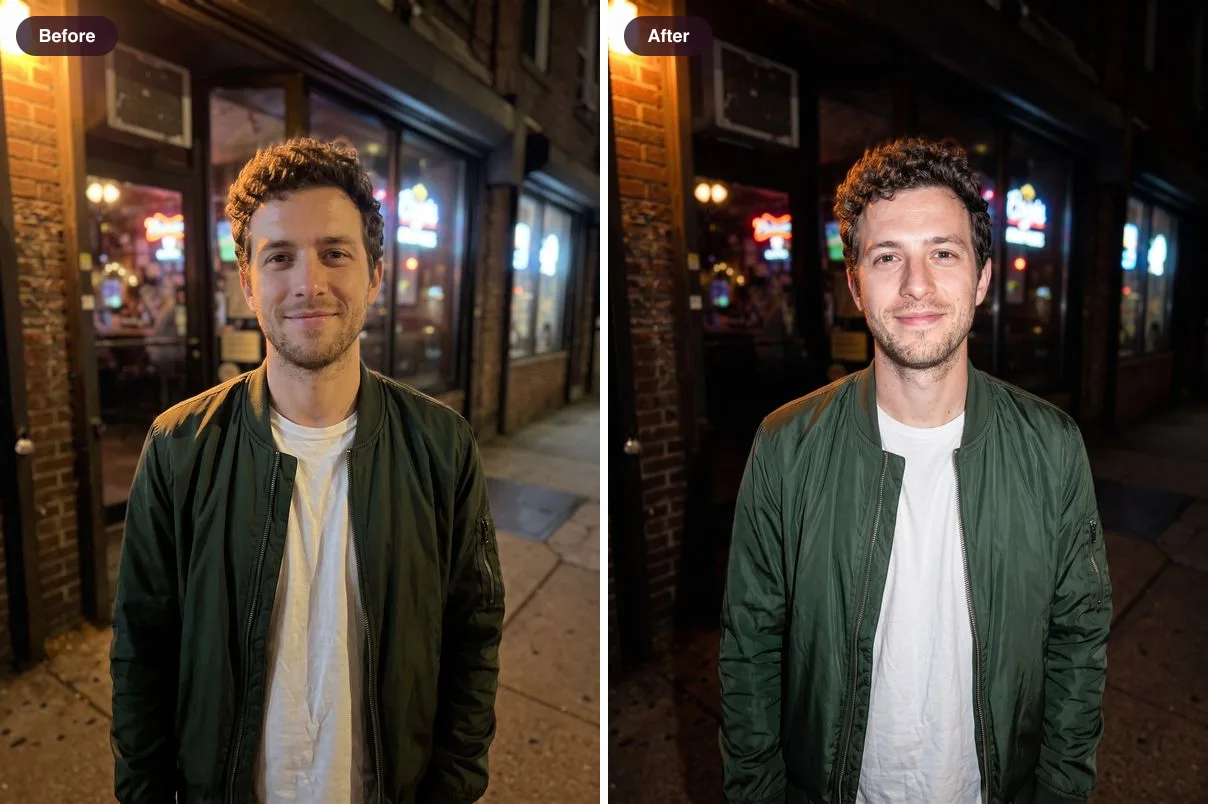
Before you pay for any app, try the look on one photo for free. Our free G7X filter finds the person in your photo, adds a direct flash and lets the background fall into shadow. It needs no account and adds no watermark.
- Open the G7X filter and choose a photo where you fill at least a third of the frame. Night and indoor photos work best.
- Pick Party flash for a dark night background, Direct flash for a brighter scene, or Soft flash for a gentler finish.
- Keep Flash strength around 90% and set Background darkness between 70% and 85%, so you stand out without the scene turning black.
- Add a little Wall shadow if you stood near a wall, and keep Grain under 15% so skin still looks clean.
- Turn on the date stamp if you want the orange compact-camera imprint, then download the full-size JPG.
- If the light in the original is too flat for a filter to fix, that is where an AI reshoot in Stunna, or the flash filter for a softer look, comes in.
Which one should you pick?
Answer these four questions and the choice is usually obvious.
- Are you on Android? Pecra's developer only publishes an iPhone app, so Stunna or the free browser filter.
- Do you want to try before paying? Start with the free G7X filter. Pecra asks for Premium first.
- One look or several? Pecra gives one automatic result. Stunna lets you choose between six flash and digicam looks and more than 80 looks in total.
- How many photos a month? If reviewers are right about a cap of about 10, heavy users will hit it fast. Stunna Pro uses a weekly fair-use allowance instead.
Other Pecra alternatives
Cocopix often appears next to Pecra, and it is a much broader AI editor with presets, prompt edits and video; see our Cocopix review. For a digital-camera finish without flash, try the free digicam filter. And if you would rather fix expressions than light, read our Retake AI review. For old or blurry photos, an enhancer is the right tool, and we compare the options in apps like Remini. Hypic and Meitu have added G7X-style digicam effects as well, and we compare both in our guide to apps like Hypic.
How we checked
Features, prices and the privacy label come from Pecra's US App Store listing, version history and website, checked on October 12, 2026. Review themes come from the 50 most recent US App Store reviews, posted between May 27 and October 4, 2026. We did not buy Pecra Premium, so its processing is described as Pecra and its users describe it. Pecra and Canon are trademarks of their owners, and Stunna is not affiliated with either. If something here has changed, tell us and we will update the page.
A few useful answers
Is Pecra free?+
Pecra is free to download, but its App Store listing says Premium is required before processing photos. A March 2026 update mentioned one free enhancement, but many later reviewers say they could not try it without paying.
How much does Pecra cost?+
On October 12, 2026, the US App Store listed Pecra Premium at $8.99 a week, $14.99 (which reviewers describe as monthly) and $89.99 a year.
Is Pecra on Android?+
Pecra's developer, PECRAS Technologies, only lists an iPhone app. There is a Google Play app called Pecra, but it is published by a different developer, First Apps LLC, so check the developer name before installing.
What does the Pecra app do?+
It gives an existing photo a Canon G7X-style finish in one automatic step: it separates the subject, adds camera-style light and detail, and softens the background.
Is there a free G7X filter?+
Yes. The G7X filter on stunna-app.com runs in your browser, adds a direct-flash look with adjustable flash strength, background darkness, wall shadow and grain, and downloads without a watermark.
What is the best Pecra alternative?+
For a free one-off, the browser G7X filter. For an app with several flash and digicam looks on iPhone and Android, Stunna. For a broad AI editor with prompts and video, Cocopix.