THE REMINI ALTERNATIVES
7 Apps Like Remini, Sorted by the Job You Need Done
Seven apps like Remini for old photos, blurry selfies, upscaling and better light, compared on price and platform, plus how Stunna compares with Remini.
Try the idea on your own photo with Stunna.


Free to download. Pro options available.

Remini is very good at one thing: taking a blurry, low-resolution or old photo and making the face sharp again. That is why it has more than 500 million installs on Google Play. People look for apps like Remini for three reasons: the ads and weekly price of its free and paid tiers, results that look over-processed, or a job Remini was never built for. Below are seven alternatives, grouped by the job they do best, starting with the one we make. Stunna is first on our list, but it does a different job from Remini, so we explain exactly where each app, Remini included, is the better choice.
The quick answer
If your photo is already sharp but looks dull, grey or badly lit, none of the enhancers will help much: start with Stunna, or Lightroom if you like editing by hand. For old family photos, MyHeritage or Pixelup. For a blurry selfie inside a full editor, Picsart. For free upscaling on a computer, Upscayl.
Sharper or better? The question to ask first
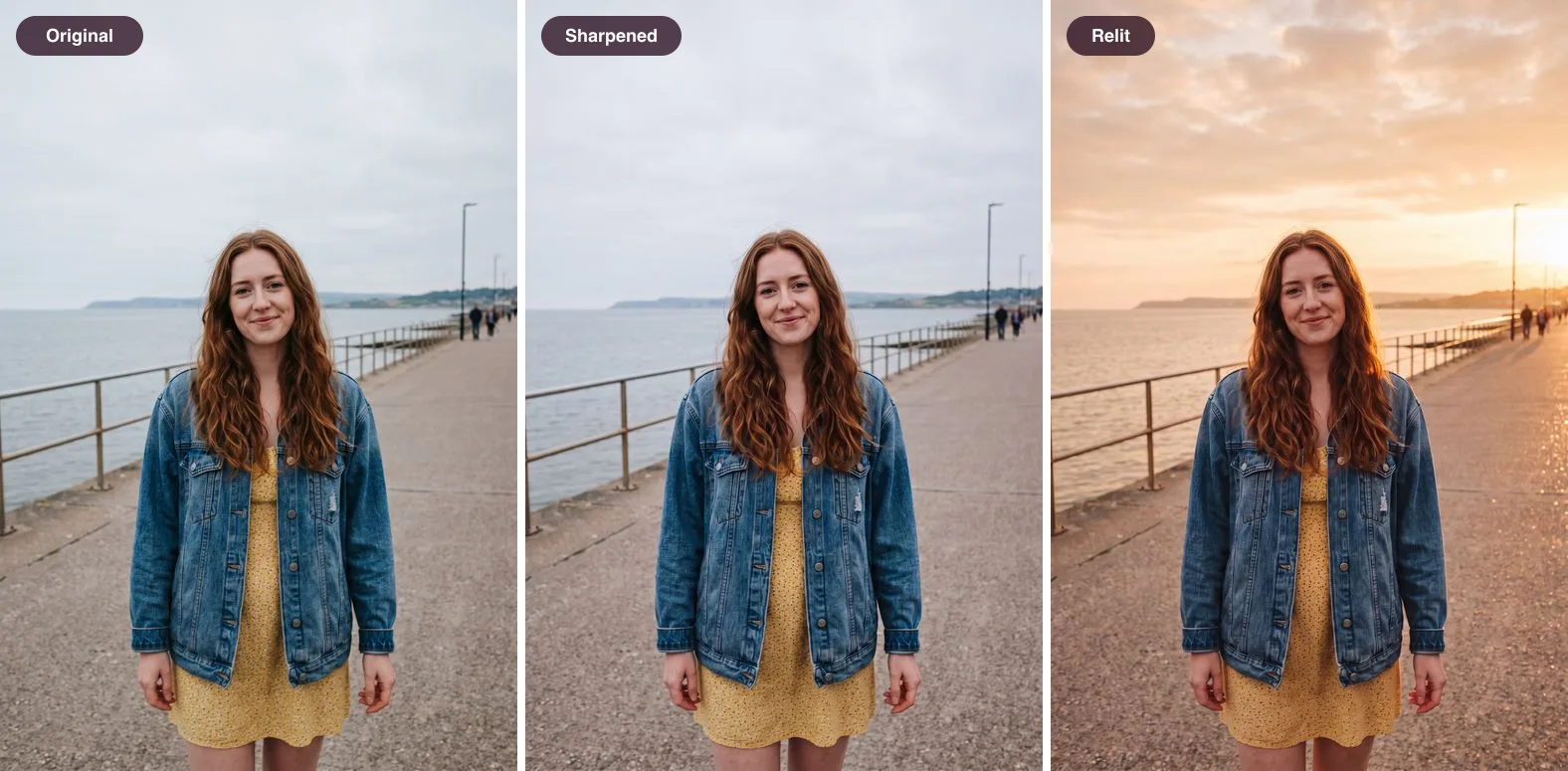
Most Remini alternatives are enhancers. They remove blur, noise and scratches and add pixels. That fixes a photo that is soft or damaged, but it does not change how the moment looked. A sharpened photo of a grey afternoon is still a grey afternoon.
The images below show the difference. The middle version is what an enhancer aims for: the same light, only crisper. The right one keeps the same person, pose and place, and changes the light, which is the job Stunna does. Many photos people run through Remini actually need the second kind of fix, or both.
Apps like Remini compared at a glance
Prices are what the US App Store or the official site showed on October 12, 2026. Several apps list more than one price for the same plan, so you may see a different one.
| App | Best at | Platforms | US price |
|---|---|---|---|
| Stunna (we make it) | Changing light, sky and camera look on sharp photos, in one tap | iPhone, Android | $6.99 a week, $17.99 a month or $69.99 a year |
| Remini (baseline) | Unblurring faces, old photos, upscaling, video | iPhone, Android, web | Free with ads; Pro $9.99 a week, Lite $4.99 to $7.99 a week, $9.99 a month |
| MyHeritage | Old family photos: repair, color, animation | iPhone, Android, web | Some free photos with a watermark; unlimited use needs its Complete plan |
| Picsart | Enhance inside a full photo editor | iPhone, Android, web, desktop | Gold $4.99 a week, $12.99 a month or $57 a year |
| Pixelup | Cheap old-photo cleanup and colorizing | iPhone, Android | Pro from $2.99; Lifetime $39.99 |
| EnhanceFox | Budget enhancing, including video | iPhone, Android | $4.99 a month, $22.99 a year |
| Upscayl | Free upscaling on a computer | Windows, Mac, Linux | Free desktop app; optional paid cloud |
| Lightroom | Manual light and color edits on sharp photos | iPhone, iPad, Android, desktop | Premium from $1.99 a month or $49.99 a year |
1. Stunna: when the photo needs better light, not more pixels
We make Stunna, so weigh this entry with that in mind. Stunna is not an enhancer, and we would not recommend it for a blurry scan. It is for the sharp photo you almost love: the trip photo under a white sky, the dinner shot in muddy light, the portrait with glare on your glasses. You pick a look, such as Golden Hour, Fiery Sunset, Night Flash, Clear Blue Sky or Glare Gone, and Stunna reshoots the photo with AI, keeping the person, pose, outfit and place. Our cloudy day photo guide explains why flat light is so hard to rescue by hand.
Compared with Remini, Stunna has no ads, costs less than Remini Pro weekly ($6.99 against $9.99, though Remini's Lite plans start lower), and adds things Remini does not list: more than 80 named looks, 100+ pose guides and a camera with an adjustable glow light. Remini wins on restoration, upscaling, video, its web app and a free-form text edit feature. Stunna is new, with too few store ratings to quote, and AI results vary, so compare each result with your original before saving.
If you just want a warmer, film-like finish on a photo without any AI, our free vintage filter runs in the browser with no watermark.
2. MyHeritage: for old family photos
MyHeritage is a genealogy service, and its photo tools are built for scanned prints: Photo Enhancer sharpens faces, Photo Repair fixes scratches and creases, colorization brings black and white photos back to life, and Deep Nostalgia animates faces. It holds a 4.9 average from about 66,000 ratings on the US App Store. Pick it if you are digitizing a family album. Skip it for selfies, and check the price first: free use is limited and watermarked, and unlimited use sits inside MyHeritage's Complete plan, which the US App Store lists at $199.99 or $249.99.
3. Picsart: enhance inside a full editor
Picsart is a full photo and video editor, and AI Enhance is one tool among hundreds, alongside templates, stickers, background removal and a separate restoration tool. It has nearly 1.2 million ratings on the US App Store, averaging 4.7, and runs almost everywhere. Pick it if you want to fix a blurry photo and then keep editing it in the same app. Skip it if you only want one-tap fixes for old photos, since the size of the editor gets in the way.
4. Pixelup: the low-cost restorer
Pixelup focuses on what most people use Remini for: enhancing faces, removing scratches, colorizing and animating old photos. It is rated 4.4 from about 39,000 ratings on the US App Store and offers a $39.99 lifetime purchase, which is rare in this category. Pick it if you want to pay once. Skip it if regular updates matter to you: its last iPhone update we could find was in September 2025.
5. EnhanceFox: budget enhancing with video
EnhanceFox covers deblurring, colorizing, scratch removal and video enhancement, and its Android listing mentions output up to 4K. At $4.99 a month or $22.99 a year, it is one of the cheapest subscriptions that includes video. Pick it if price is your main concern. Skip it if you want an actively maintained app with clear support: its last iPhone update was in March 2025.
6. Upscayl: free upscaling on your computer
Upscayl is a free, open-source desktop app for Windows, Mac and Linux. It enlarges images up to 16 times and can process a whole folder at once, all on your own machine. Its own documentation says it does not remove blur, and it needs a compatible graphics card. Pick it to enlarge many photos for free and in private. Skip it if you want faces fixed or need a phone app.
7. Lightroom: manual control over light and color
Adobe Lightroom is the professional choice when a photo is sharp but the light and color are off. You get exposure, curves, color mixing and masks, and you control every change. It is rated 4.8 from about 337,000 ratings on the US App Store, with Premium from $1.99 a month. Pick it if you enjoy editing and want precise, repeatable results. Skip it for blurry or damaged photos, which it is not built to restore, and if you want a finished look in one tap.
Why people leave Remini
Remini's results are rarely the problem; even many negative reviews admit the enhancing works. The complaints are about everything around it. In October 2026, the most common Google Play complaint was the number of ads in the free tier, with ads before opening, enhancing and saving. Next come weekly billing and trials that convert, "unlimited" plans that still hit limits, and faces that come out too smooth or too bright, including reports that darker skin gets lightened.
None of the alternatives above solves every one of these. If ads are your main problem, Upscayl and Stunna show none, while some of the cheaper phone apps carry ads on Android. If over-smoothing is the issue, check faces closely in any AI tool, using the five points in our AI photo editing checklist.
What Remini still does best
To be fair to Remini: for a single blurry face, it is still among the best one-tap tools, and it covers photos, video and old prints in one app, on your phone or in a browser. It also added text editing, so you can type a change such as a new background or a vintage film look. Its privacy policy says enhancement uploads are deleted after one day. If Remini works for you and the ads or price do not bother you, there is little reason to switch.
Which one should you pick?
Start with the photo, not the app.
- A sharp photo with dull or ugly light, and one tap: Stunna. For more on light you can fix before you shoot, see the golden hour photography guide.
- A scanned or damaged print: MyHeritage, Pixelup or Remini.
- A blurry selfie you also want to edit: Picsart.
- Hundreds of photos to enlarge, for free: Upscayl.
- A sharp photo with dull or ugly light, and time to edit: Lightroom.
Other comparisons
If you came here looking for AI selfie fixes rather than restoration, our Retake AI review covers expression edits trained on your face. For trend looks like the Canon G7X flash, see the Pecra app review, and for a broad AI editor with prompts and video, read the Cocopix review.
How we checked
Features, prices and ratings come from each app's US App Store listing, Google Play listing or official website, checked on October 12, 2026. Remini review themes come from Google Play reviews, and its privacy details from Bending Spoons' privacy policy. We did not run the same photos through every app, so we describe features as their developers list them. Remini and the other apps named here belong to their developers, and Stunna is not affiliated with any of them. If a price or feature has changed, tell us and we will update the page.
A few useful answers
What is the best app like Remini?+
It depends on the photo. For sharp photos that need better light, Stunna, or Lightroom if you edit by hand. For old family photos, MyHeritage or Pixelup. For blurry selfies inside a full editor, Picsart. For free upscaling on a computer, Upscayl.
Is there a free alternative to Remini?+
Upscayl is free and open source for Windows, Mac and Linux, but it upscales rather than unblurs. Most phone apps in this category are free to download with paid plans or limited, watermarked free use.
Is Remini free?+
Remini is free to download and has an ad-supported free tier. Paid plans on the US App Store include Pro at $9.99 a week, Lite from $4.99 to $7.99 a week and a $9.99 monthly option.
Which app is best for restoring old photos?+
MyHeritage is built for scanned family photos, with repair, colorization and animation. Remini and Pixelup also restore old photos well. Stunna is not a restoration app.
Can Remini change the lighting of a photo?+
Remini focuses on sharpening, restoration and upscaling, and its text editing can change things like the background. For one-tap light changes that keep the scene, such as golden hour or a night flash, Stunna is built for that job.
Is Stunna a Remini alternative?+
Only for some photos. Stunna does not unblur or restore. It changes light, sky, camera look and color on photos that are already sharp, with no ads and plans from $6.99 a week.