COCOPIX VS STUNNA
Cocopix Review: What You Get, What the Cocoins Cost, and When Stunna Fits Better
What Cocopix does, how its subscription and Cocoins work, what users complain about, and when Stunna is the better pick.
Try the idea on your own photo with Stunna.


Free to download. Pro options available.

Cocopix is one of the most ambitious young AI photo apps. It offers aesthetic presets like Clean girl, Y2K and soft film, edits you type or brush onto a photo, four AI models, AI video, a Glow Camera and a web app. It also has a pricing model that confuses many new users: a subscription and a separate coin balance. We make Stunna, a narrower AI photo editor, so read this as a competitor's review. Every fact about Cocopix comes from its store listings, website and public reviews, checked on October 12, 2026, and we point out where Cocopix is the better choice.
The short answer
Choose Cocopix if you want a creative playground: restyle a photo as anime or an oil painting, type exactly what to change, brush over an area, animate a photo or work on the web.
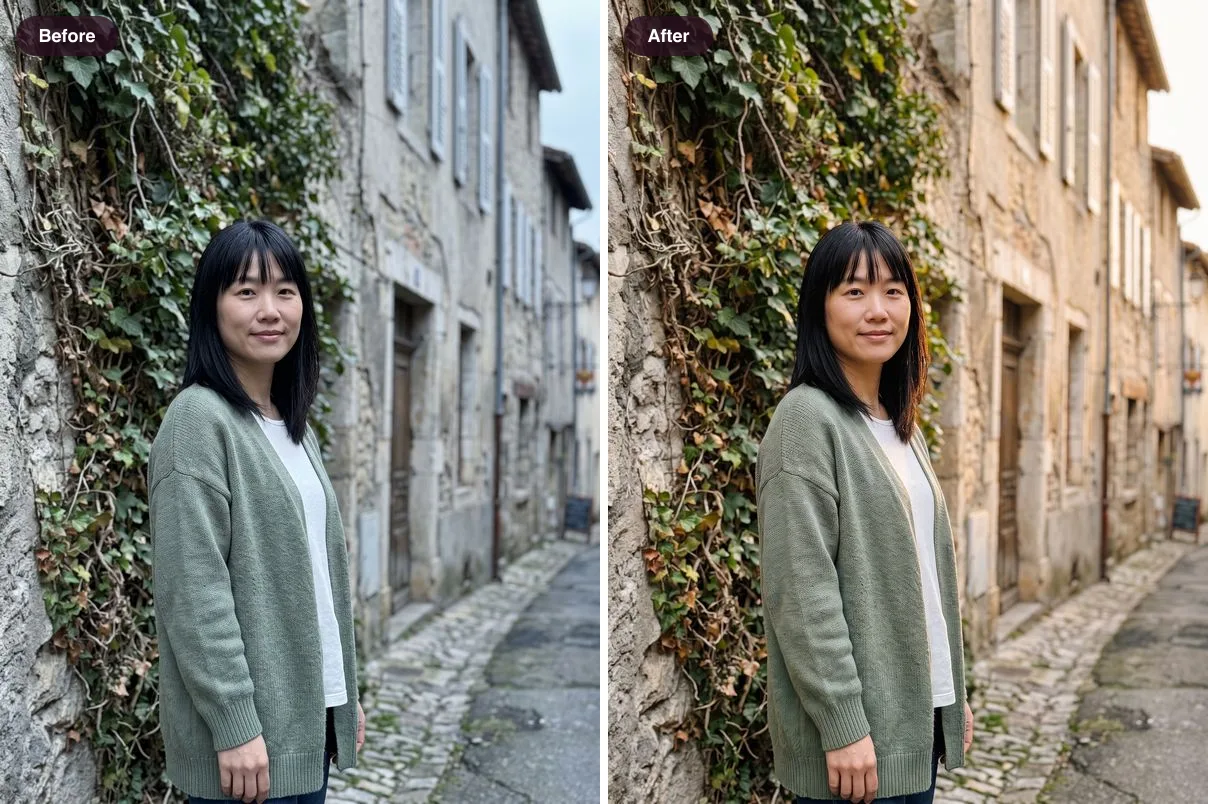
Choose Stunna if you want your photo to stay your photo. Stunna keeps your face, pose, outfit and place, and changes the light, sky, camera look or color, with one subscription and no coins to top up. That matters because face changes are the most common complaint in Cocopix's written reviews.
Cocopix vs Stunna at a glance
Cocopix lists different prices on its website and in the App Store, and several App Store prices for the same plan, which usually means price testing. We show both.
| Cocopix | Stunna | |
|---|---|---|
| Approach | Generative edits: presets, typed prompts and brushed areas | Reshoots that keep the person, pose and place, and change light, sky, camera look or color |
| Looks | Clean girl, grunge, Y2K and soft film, plus styles such as anime and oil painting | 80+ looks, including Clean Girl, Golden Hour, Euro Summer, Night Flash and Disposable |
| Typed or brushed edits | Yes, with four AI models: Fast, Wild, Pro and Hyper | No. Curated looks only |
| Video | AI video and animated photos | Before-and-after reveal videos of your edit |
| Camera | Glow Camera with vintage looks applied as you shoot | Camera with an adjustable glow light and 100+ pose guides |
| Platforms | iPhone, Android and web | iPhone and Android |
| US price | Website: $5.99 a week with 150 Cocoins, or $59.99 a year with 1,200 Cocoins. App Store: $5.99 to $9.99 a week, $29.99 or $59.99 a year | $6.99 a week or $69.99 a year |
| Extra charges | Cocoin top-ups from $9.99; cost per edit not published | None. Pro has a weekly fair-use allowance and no coin balance |
| Free trial | None | None; free edits can be earned in the app |
| Store ratings | 4.4 from 443 (App Store), 4.6 from 4,265 (Google Play) | Launched June 2026, too few ratings to quote yet |
How Cocopix works
You pick or take a photo, then either choose a preset or describe what you want. The AI generates a new version, which you can save, share or keep refining. For targeted changes, you brush over part of the photo and type the edit, such as adding or removing an object.
Four models trade speed for quality: Fast, Wild (which Cocopix describes as being for pranks and more sensitive edits), Pro and Hyper. Beyond single photos, AI photoshoots turn one picture into a set, and recent updates added animated photos, a compare slider, an Effects tab and camera improvements. The team ships updates about twice a week, which is unusually fast.
How the subscription and Cocoins work
This is the part to understand before you subscribe. A Cocopix subscription includes a set number of Cocoins, and AI generations spend them. On the website, the weekly plan includes 150 Cocoins and the yearly plan 1,200. When they run out, you buy more: 200 Cocoins cost $9.99 in both the App Store and on the website.
Cocopix does not publish how many Cocoins one edit costs. One App Store reviewer reports 50 to 100 per edit. If that is right, 150 weekly Cocoins cover one to three edits a week, and the yearly allowance covers somewhere between 12 and 24 edits before top-ups. Treat those numbers as an estimate built on one user's report, and check the cost shown in the app before you subscribe.
Stunna Pro does not use coins. Reshoots are included, with a weekly fair-use allowance to stop abuse.
What Cocopix does well
Range is the obvious strength. Few apps let you go from a soft film preset to a typed edit to an animated photo in one place, and the web app is useful if you edit on a laptop. On Google Play it holds a 4.6 average from more than 4,000 ratings, and fans like how polished the results look: one reviewer said it "makes my photos look professionally done".
Its privacy policy is also clearer than many in this category: it says uploaded photos are deleted shortly after processing, results are kept for about 72 hours, and no biometric templates are created.
What users complain about
Cocopix's star ratings are good, but its written App Store reviews skew negative: one review aggregator classed about two thirds of them as negative in September 2026. The recurring themes:
- Faces that change. "Changes my face every picture, looks nothing like me" sums up the most common complaint. Generative edits can redraw a face, especially on stronger presets.
- Coins on top of the subscription. Several reviewers did not expect to need Cocoins after paying, and some say the price differs from what the ads showed.
- Failed generations, with "something went wrong" errors on some photos.
- No free trial, so you pay before you know if the results suit your face.
Where Stunna is different
Stunna is built around one promise: the person in the photo stays the person in the photo. You choose a look and Stunna reshoots the photo with AI, keeping the face, pose, outfit and place while it changes what was wrong, usually the light. A flat overcast photo can get Golden Hour or Euro Summer warmth, and a dim night photo can get Night Flash. Our warm film look guide shows how far color alone can take a photo.
If you like Cocopix's aesthetic presets, Stunna has its own set, including Clean Girl, Coquette, Old Money and Dark Academia, and its Throwbacks range covers Disposable, Polaroid, VHS Camcorder and Digicam Y2K. You also get 100+ pose guides and a glow-light camera for the next photo, and our easy photo poses guide is a good place to start.
What Stunna does not do: typed prompts, brushed edits, anime or painting styles, AI video or a web app. If you need those, Cocopix is the better tool. And like any AI editor, Stunna can get details wrong, so compare each result with your original before saving.
Which one should you pick?
Three questions settle it for most people.
- Do you want to change what is in the photo, or how it looks? To add, remove or restyle things, use Cocopix. For better light, a camera look or a small fix on the same scene, use Stunna.
- How much does your face need to stay exactly the same? If it matters, test Cocopix on one photo before you commit, or use Stunna, whose looks are designed to keep you as you are.
- Do you want to budget per edit? Cocopix charges Cocoins per generation on top of the plan. Stunna Pro has no per-edit currency.
Other Cocopix alternatives
Pecra is often listed as Cocopix's closest rival, but it does one thing, a G7X-style camera finish; our Pecra app review covers it. For face-only fixes trained on your selfies, see the Retake AI review. For restoring old or blurry photos, see apps like Remini. And for a free film look in the browser, try the disposable camera filter. For face filters like aging, smiles and gender swaps, see our guide to apps like FaceApp.
How we checked
Features, prices and privacy details come from Cocopix's US App Store listing and version history, its Google Play listing, and the pricing, editing and privacy pages on cocopix.app, all checked on October 12, 2026. Review themes come from App Store and Google Play reviews and a September 2026 review aggregation. We did not buy a Cocopix plan, so the Cocoin cost per edit is a user report, not our measurement. Cocopix belongs to The Growing Co. Labs, and Stunna is not affiliated with it. If anything here is out of date, tell us and we will correct it.
A few useful answers
Is Cocopix free?+
Cocopix is free to download, but AI generations need a subscription, and each generation spends Cocoins from your plan. Cocopix does not offer a free trial.
How much does Cocopix cost?+
On October 12, 2026, the Cocopix website listed $5.99 a week with 150 Cocoins or $59.99 a year with 1,200 Cocoins. The US App Store showed weekly prices from $5.99 to $9.99 and yearly prices of $29.99 and $59.99. Extra Cocoins start at $9.99 for 200.
What are Cocoins?+
Cocoins are the credits Cocopix spends on AI generations. Each plan includes some, and you can buy top-ups. Cocopix does not publish the cost per edit; one reviewer reports 50 to 100 Cocoins.
Does Cocopix change your face?+
It can. Face changes are the most common complaint in its written reviews, because generative presets and prompts can redraw a face. Test it on one photo before relying on it.
Is Cocopix on Android?+
Yes. Cocopix is on Google Play, the App Store and the web.
What is a good Cocopix alternative?+
If you want to keep your face and change the light, sky or camera look, Stunna. If you want a single G7X-style finish on iPhone, Pecra. For free filters without coins, the browser tools on stunna-app.com.