THE DIGICAM PHOTO GUIDE
Digicam Look on Your Phone: Y2K Flash Photo Guide
Direct flash, slightly cool color and candid moments. Four steps for digicam-style photos on your phone, plus when night mode is the better choice.
Try the idea on your own photo with Stunna.


Free to download. Pro options available.
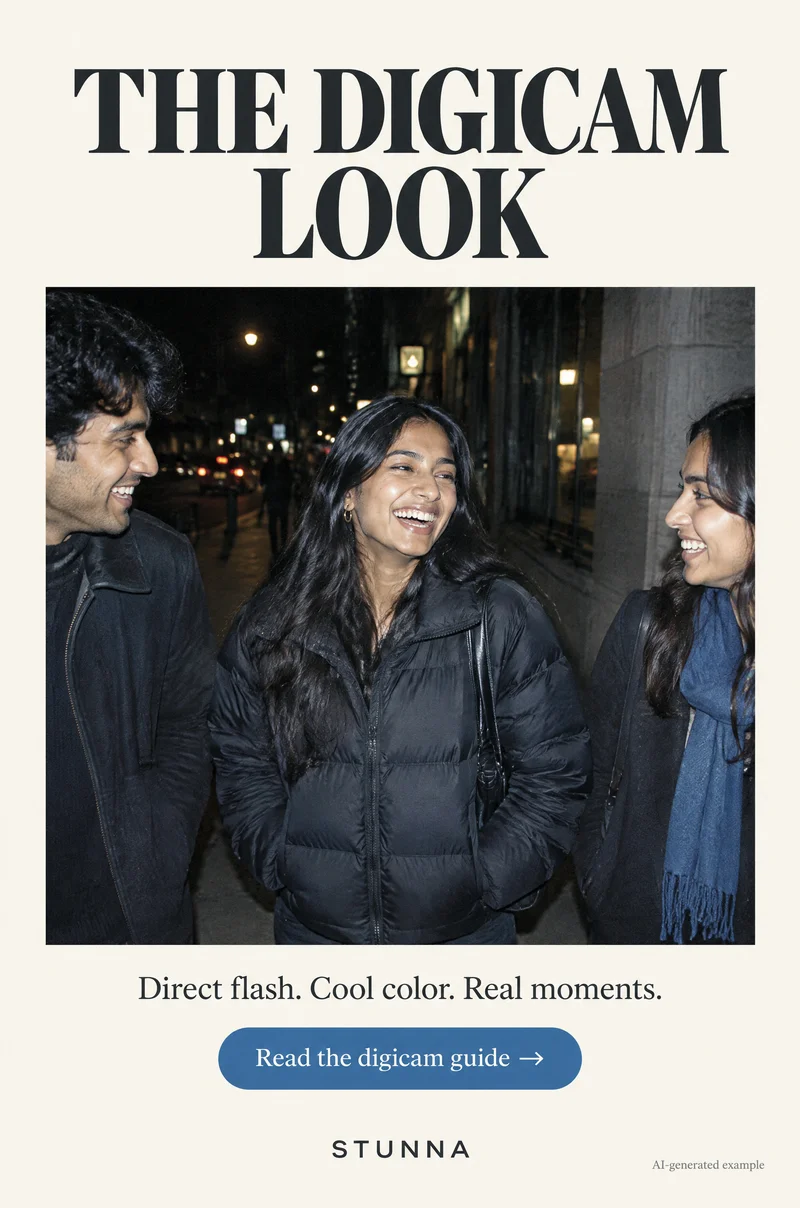
The digicam look comes from small point-and-shoot cameras of the early 2000s: a bright direct flash, slightly cool color, a darker background and friends caught mid-laugh. You can get close to it with a phone if you set up the moment the right way. The illustrations here are AI-generated examples, not actual Stunna results.
What makes a photo look like a digicam
Old compact cameras had small sensors and a flash right beside the lens. At night that meant the subject was lit hard and evenly while the background fell off into darkness. Color often leaned slightly cool, highlights clipped easily and the whole frame looked a bit flatter than a modern phone photo.
Modern phones work hard to do the opposite: they brighten shadows, merge several exposures and balance the whole scene. That is great for most photos, but it removes the contrast between a flash-lit person and a dark street that makes the digicam look recognizable. The steps below put that contrast back.
Get the digicam look: 4 steps
Save these four steps for your next night out. They matter more than any filter.
- 01 Flash on, stay close: set the flash to on rather than auto and stand roughly a couple of steps from your subject. Phone flash is small, so it only lights people nearby; too far away and the frame turns muddy.
- 02 Shoot at night or indoors: the look depends on a darker background. A sidewalk at night, a diner booth, a hallway or a bar gives the flash something to stand out against. In daylight the flash barely shows.
- 03 Keep it candid: shoot while people talk, laugh, eat or walk. Digicam photos feel like evidence of a night, not a portrait session, so take a few quick frames instead of directing a perfect pose.
- 04 Edit cool, not crunchy: nudge the warmth slightly cooler and keep contrast moderate. Avoid heavy sharpening, clarity or fake grain; the original look was soft and a little flat, not gritty.
Phone night mode vs digicam-style flash
Night mode and digicam-style flash solve the same dark scene in opposite ways. Night mode takes a longer capture to brighten the whole frame, so the street, the lights and the faces all become visible. A digicam-style flash photo lights only the people close to the lens, so they pop against a darker background with cooler color.
Use night mode when the place matters: a skyline, a decorated street, a candlelit table you want to remember in full. It needs a steady phone and a still subject, as [Apple's Night mode guide](https://support.apple.com/guide/iphone/take-night-mode-photos-iph1a3c5b4c3/ios) explains, so it suits quiet moments more than dancing.
Use digicam-style flash when the people matter and they are moving: laughing friends, a toast, a walk home. The flash freezes motion that night mode would blur. If you are not sure, take one of each; same moment, two moods, and you can choose later.
- Night mode: bright overall scene, natural ambient color, needs stillness, softer subject.
- Digicam-style flash: subject pops, darker background, cooler color, freezes movement.
Framing that feels like 2004
Keep the background simple. A plain wall, a dark street or a booth works better than a busy scene full of bright signs, which compete with the flash-lit faces. Hold the phone at chest or eye height and tilt it slightly if it feels natural; digicam photos were rarely perfectly level.
Use the main camera instead of the ultra-wide. The ultra-wide stretches faces near the edges and pushes people further away from the flash. Group photos work when everyone is at a similar distance from the phone, so the flash lights them evenly.
Common mistakes
Most failed digicam attempts come from one of these.
- Leaving flash on auto: the phone may skip the flash and use a long exposure instead.
- Standing too far away: phone flash falls off fast, so faces end up dim and grainy.
- Shooting in a bright room: without darkness behind the subject the flash look disappears.
- Over-editing: crushed blacks, heavy grain and orange skin read as a filter, not a camera.
- Posing everyone formally: the look is about moments, so keep the camera moving with the night.
Edit lightly
In your phone's editor, cool the warmth a little, lower highlights slightly if faces look hot and leave saturation close to the original. On iPhone the Photos app's Adjust tools let you change settings such as exposure and highlights, as shown in [Apple's editing guide](https://support.apple.com/guide/iphone/edit-photos-and-videos-iphb08064d57/ios). Android editors vary by device but usually include similar warmth and brightness sliders.
For related looks, see the G7X-inspired flash photo guide, the disposable camera photo guide and the film grain photo guide if you want texture without overdoing it. If someone is wearing sequins, our sequin party photo guide shows how to keep the flash from flaring.
A few useful answers
How do I get the digicam look on my phone?+
Turn the flash on, stay close, shoot at night or indoors, keep the moment candid and edit slightly cool without heavy sharpening or grain.
Is night mode or flash better for night photos?+
Night mode is better for still scenes where the place matters. Digicam-style flash is better for moving people you want to pop against a dark background.
Why do my digicam-style photos look orange instead of cool?+
Warm room light is mixing with the flash. Get closer so the flash dominates, then cool the warmth slightly in your editor.